Email Authentication: Stopping Spoofing with SPF, DKIM, and DMARC
Plenty of the emails we receive every day are phishing messages that impersonate a business partner or a well-known company's domain. The technologies that let us detect these "spoofed emails" are SPF, DKIM, and DMARC. Each one helps on its own, but it's only when you combine all three that you get spoofing protection strong enough for real-world use. In this article, we'll look at how each of them verifies that an email is legitimate, using DNS (Domain Name System, the system that maps domain names to server information) record examples along the way.
Why Do We Need Email Authentication?
SMTP (Simple Mail Transfer Protocol), the foundation of email delivery, was designed in the 1980s. It has no way to verify that the sender address a message claims really belongs to that person or domain. That means it's technically possible to put any email address in the From field, and spoofed emails exploiting this have been a problem for a long time.
Spoofed emails are often the entry point for phishing scams and targeted attacks. They harm not only the recipient but also the trust of the company or brand being impersonated. SPF, DKIM, and DMARC were created to address this problem, and you can deploy all of them just by adding records to DNS. You don't need any new software, and the fact that you can retrofit them onto an existing mail environment is one reason these technologies have become so widespread.
How SPF (Sender Policy Framework) Works
SPF verifies whether the mail server that sent a message is an authorized sender for the domain. The domain administrator publishes the IP addresses of the servers allowed to send mail for that domain as a DNS TXT record (a type of DNS record that can hold arbitrary text). When a server receives a message, it checks whether the sending IP address is on that list. If it isn't, the server concludes that the message did not come from an authorized sender.
What SPF checks is not the "header From" shown in your mail client, but the "envelope From" used during the SMTP conversation (the sender address used for routing the message, which is normally not displayed on screen). This difference matters when we get to DMARC alignment later, so keep it in mind.
Let's start with a basic SPF record. It allows the company's own mail server IP address and also permits sending through an external service such as Google Workspace.
example.com. IN TXT "v=spf1 ip4:203.0.113.10 include:_spf.google.com ~all"
The following table explains each element.
| Element | Meaning |
|---|---|
v=spf1 | A fixed string that indicates the SPF version |
ip4: | An IP address allowed to send mail |
include: | Pulls in the SPF record published by another domain. Commonly used when you rely on an external mail delivery service |
~all | Treats mail from IP addresses not on the list as a soft fail (a lenient treatment: the sender doesn't look legitimate, but the message is still accepted and just marked) |
If you want to clearly reject mail from IP addresses not on the list, you'll often see -all (hard fail, which declares the sender unauthorized) used instead.
example.com. IN TXT "v=spf1 ip4:203.0.113.10 include:_spf.google.com -all"
SPF has a specification limit: the chain of include lookups for a single domain is capped at 10 DNS queries. It's easy to exceed this if you use many external services, so keep it in mind when designing your record.
RFC 7208: Sender Policy Framework (SPF) for Authorizing Use of Domains in Email, Version 1 | RFC Editor
Email on the Internet can be forged in a number of ways. In particular, existing protocols place no ...
How DKIM (DomainKeys Identified Mail) Works
DKIM adds a digital signature (a code generated with a private key that only the sender holds, which lets you detect tampering) to the body and some of the headers of an email. While SPF verifies the sending IP address, DKIM verifies that the content of the message hasn't been altered since it was sent.
The sending mail server signs the message with its private key and publishes the matching public key as a DNS TXT record. The receiving server verifies the signature attached to the message using the public key it fetches from DNS. If the signature is valid and the body and headers haven't changed since sending, authentication succeeds. If the content was modified somewhere along the delivery path, signature verification fails, so tampering can be detected.
Now let's look at an example DKIM record. The selector1 part is called the selector, an identifier that lets you use multiple keys for the same domain.
selector1._domainkey.example.com. IN TXT "v=DKIM1; k=rsa; p=MIGfMA0GCSqGSIb3DQEBAQUAA4GNADCBiQKBgQC..."
v=DKIM1 is the DKIM version, k=rsa is the cryptographic algorithm, and the long string after p= is the public key itself. A DKIM-Signature header is added to the sent message, and it includes the selector used for signing, so the receiving server knows which DNS record to look up.
When you deploy DKIM, key rotation (replacing the private key periodically) is also an important operational task. If you prepare multiple selectors, both the old and new signatures stay valid while you switch from the old key to the new one.
RFC 6376: DomainKeys Identified Mail (DKIM) Signatures | RFC Editor
DomainKeys Identified Mail (DKIM) permits a person, role, or organization that owns the signing doma...

How DMARC (Domain-based Message Authentication, Reporting & Conformance) Works
DMARC lets the sending domain specify a policy for what to do with messages that fail authentication, based on the results of SPF and DKIM. On their own, SPF and DKIM only determine whether verification passed or failed, and whether to reject a failing message was left to the receiving server. DMARC lets the sender state that explicitly.
Another key element of DMARC is a consistency check called alignment. Even if SPF or DKIM verification itself succeeds, DMARC treats the message as failed if the domain used in that verification doesn't match the domain in the header From shown in the mail client. This lets DMARC handle a more sophisticated spoofing technique: passing SPF or DKIM checks while swapping only the header From to a different domain.
Finally, let's look at an example DMARC record.
_dmarc.example.com. IN TXT "v=DMARC1; p=quarantine; rua=mailto:dmarc-reports@example.com; pct=100; adkim=s; aspf=s"
The following table explains the main elements.
| Element | Meaning |
|---|---|
v=DMARC1 | A fixed string that indicates the DMARC version |
p= | How to handle mail that fails authentication (none/quarantine/reject) |
rua= | Email address to send aggregate reports to |
pct= | Percentage of messages the policy applies to |
adkim= / aspf= | Alignment strictness (s = strict, r = relaxed) |
There are three possible values for p=, and each one is handled as follows.
| Value | Handling of failed messages |
|---|---|
| none | Deliver as usual, but keep the result as a record |
| quarantine | Isolate the message, for example in the spam folder |
| reject | Reject the message outright |
Another useful part of a DMARC setup is the aggregate reports specified by rua=. Receiving mail servers periodically send back reports on how much mail was sent using your domain and how many of those messages passed SPF and DKIM. By reviewing these reports, you can see how much mail is impersonating your domain, and whether any of your legitimate mail delivery services are failing authentication.
RFC 7489: Domain-based Message Authentication, Reporting, and Conformance (DMARC) | RFC Editor
Domain-based Message Authentication, Reporting, and Conformance (DMARC) is a scalable mechanism by w...
How SPF, DKIM, and DMARC Work Together to Stop Spoofing
Each of the three technologies verifies something different. SPF checks the sending IP address, DKIM checks whether the message content has been tampered with, and DMARC evaluates those two results together with alignment against the header From to decide the final handling. The diagram below shows the order in which these checks happen, from the moment a message is received until it reaches the inbox.
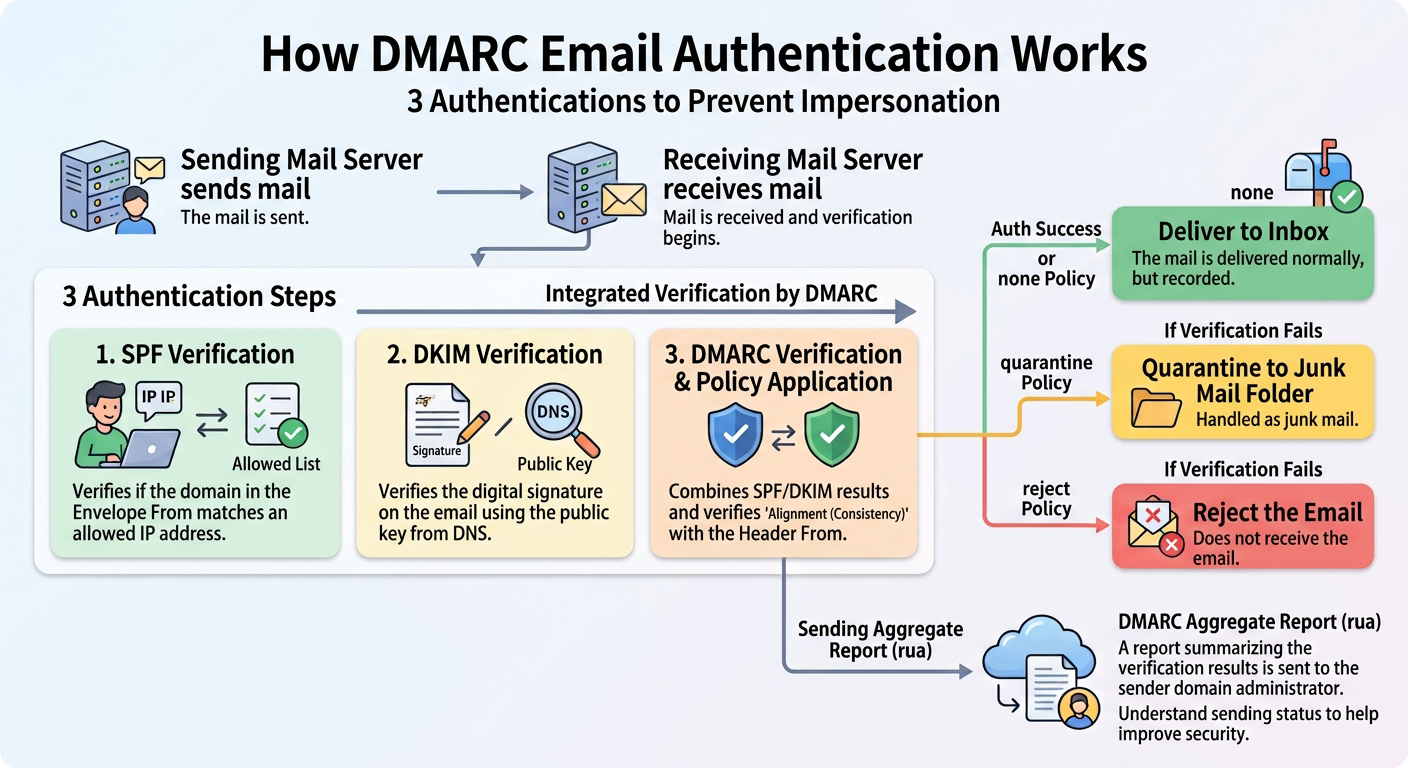
As the flow shows, SPF and DKIM are verified independently, and DMARC takes their results, checks alignment, and decides the final handling. Another point worth remembering is that DMARC passes if either SPF or DKIM succeeds with alignment. In other words, even if SPF fails for some reason, a message won't be judged as spoofed as long as its DKIM signature is valid and matches the header From.
Comparing the Three Technologies
To summarize what we've covered, here are the differences in the roles of the three technologies.
| Item | SPF | DKIM | DMARC |
|---|---|---|---|
| What it verifies | Sending IP address | Whether the content was tampered with | SPF and DKIM results, plus alignment |
| DNS record used | TXT record | TXT record (per selector) | TXT record (_dmarc) |
| Effect when deployed alone | Limited | Limited | Depends on SPF and DKIM results |
| Who decides how failures are handled | Receiving side's discretion | Receiving side's discretion | Sender can specify explicitly |
| Resilience to forwarded mail | Tends to fail on forwarding | Relatively resilient | Often rescued by DKIM passing |
As the table shows, SPF has a weakness: when mail passes through a mailing list or forwarding service, the sending IP address changes, so authentication tends to fail. A DKIM signature, on the other hand, stays valid after forwarding as long as the body and headers aren't modified, so DKIM holds up better for forwarded mail. DMARC evaluates the two together, so each covers for the other's weakness.
Common Misconfigurations and Things to Watch Out For
There are a few pitfalls that people commonly run into when deploying email authentication. Keep them in mind as you plan your rollout.
The first is starting DMARC with p=reject right away. If there are mail delivery paths you don't know about (for example, a delivery service the sales department signed up for on its own) that don't support SPF or DKIM, even legitimate mail will be rejected. The standard practice is to start with p=none and collect reports, then tighten the policy step by step to quarantine and then reject while watching the authentication success rate.
The second is registering multiple SPF records for a single domain. Under the SPF specification, a domain can have only one valid SPF record, and if there are several, verification doesn't work correctly. Rather than adding a new record each time you add an external service, you need to append an include to the existing record.
The third is forgetting to set a policy for subdomains. In a DMARC record, you can specify a separate policy for subdomains with sp=, but if you omit it, the subdomains inherit the value of p= from the main domain. Unused subdomains can also be abused for spoofing, so make sure you take subdomains you don't actively operate into account as well.
Also, in setups where mail is forwarded many times, even DKIM signatures can break. To compensate, a technology called ARC (Authenticated Received Chain, a mechanism that stacks up the authentication results at each hop along the forwarding path like a chain) has emerged. If you run a mailing list, it's worth considering as well.
RFC 8617: The Authenticated Received Chain (ARC) Protocol | RFC Editor
The Authenticated Received Chain (ARC) protocol provides an authenticated "chain of custody" for a m...
Summary
We've covered how SPF, DKIM, and DMARC work, example DNS records for each, and how the three combine to verify email. If you're considering deploying them as a spoofing countermeasure, keep these points in mind.
- SPF verifies the sending IP address, checking whether the message was sent from a server authorized for the envelope From domain
- DKIM uses a digital signature to verify that the message content hasn't been tampered with, and it's relatively resilient to forwarded mail
- DMARC checks alignment with the header From in addition to the SPF and DKIM results, and lets the sending domain specify how failed messages should be handled
- Tighten your DMARC policy gradually while monitoring delivery. Setting it to reject right away can block legitimate mail
- Aggregate reports let you continuously monitor how much mail is impersonating your domain and how well your own mail passes authentication